
Teaching an AI Pilgrim to Sound Australian: Building the Daily Camino Reel
How the daily mycaminoguide.com Instagram reel gets made: Seedance through Higgsfield, a consistent AI host, and the work of fixing his accent.
I built mycaminoguide.com, an AI app to help people plan and walk the Camino de Santiago. Every day the app also posts a short Instagram reel: a weathered pilgrim looks into the camera, gives the day's weather along the route, and signs off with a friendly word. The reel is a single Seedance 2.0 generation run through Higgsfield, and the script is assembled from that morning's Camino news and weather.
Before getting into the host himself, it helps to understand the plumbing, because the plumbing shaped a lot of the decisions.
The tools, and one gap that changed everything
Higgsfield through the MCP
Higgsfield exposes its models through an MCP server, which means I can drive image, video, and audio generation straight from my coding agent. The pattern is the same for every model. You submit a job, you poll its status until it reports completed, and the finished payload carries a URL to the result.
// submit, then poll until the job is done
const { id } = await generateVideo({
  model: "seedance_2_0",
  aspect_ratio: "9:16",
  duration: 11,
  prompt,
});

let job;
do {
  job = await jobStatus(id); // sync mode blocks ~25s per call, then returns
} while (job.status !== "completed");

const url = job.results.rawUrl; // mp4, ready to download or hand to Instagram
Images come back in ten to twenty seconds, video in a couple of minutes. This is a lovely way to work while you are iterating. You stay in one place, you can chain a generation into the next step, and you can inspect every result as it lands.
The gap: no REST API for the new models
The catch is that the MCP server uses interactive sign-in. That is fine on my machine, but it cannot run unattended on a schedule in the cloud. For an automated daily post you want a plain REST API with a key and secret that a cron job can call at the same time every morning, with no human present.
Higgsfield does have a REST API, and the daily pipeline is written against it. The problem is
that the two models I need, Seedream 4.5 for the image and Seedance 2.0 for the video, are not
available there yet. Calling them by their ids returns a model not found error. The older
models are present, the new ones are not.
That single gap is why the daily reel currently runs as an interactive flow from my coding agent rather than a hands-off cron job. The cloud code path already exists and mirrors the same request shape, so the switch is small once the REST API catches up:
// the cloud path, waiting on a REST model that does not exist yet
const tmpFile = await generateVideoToTmpFile({
  prompt,
  durationSeconds: 11, // matches the interactive MCP call exactly
});
The Instagram side
Publishing uses the Instagram Graph API, and it is a two-step dance. First you create a media container, then you publish it. For a reel you also have to poll the container until it reports finished, because the video needs a moment to process.
async function publishReel(videoUrl, caption) {
  const id = await createContainer({
    media_type: "REELS",
    video_url: videoUrl,
    caption,
  });
  await waitUntilFinished(id); // poll status_code until FINISHED
  return publish(id);          // retries if Meta replies "media not ready"
}
One requirement bit me. The image has to be a JPEG that Meta can fetch from a public URL, and the Higgsfield image result is a PNG. So the image step converts the PNG to a JPEG, uploads it to blob storage for a public URL, and hands that to Instagram. The reel mp4 URL can be published directly.
// Instagram needs a JPEG it can fetch; Higgsfield gives a PNG
execFileSync("sips", ["-s", "format", "jpeg", pngPath, "--out", jpgPath]);
const { url } = await put(`instagram/${name}.jpg`, readFileSync(jpgPath), {
  access: "public",
  contentType: "image/jpeg",
});
await publishImage(url, caption); // hand Meta the public JPEG URL
All of this needs a long lived access token with publish permission, which means going through app review first.
With the plumbing clear, on to the prompt.
The prompt: one consistent host, one changing scene
The whole point of a daily reel is that the same person shows up each day. If the host's face, voice, and manner drift around, it stops feeling like a guide you know and starts feeling like a random stranger generated by a machine, which of course it is.
So the prompt is not written by hand each day. It is assembled by small, predictable functions that take the morning's weather and return one long prompt. The trick to consistency is to keep the identity blocks fixed and let only the weather change.
// the bits that never change between clips
const HOST =
  "The pilgrim is the same recurring host every time, a consistent character with these " +
  "exact fixed features: a late-forties male with short, tousled salt-and-pepper hair, a " +
  "short salt-and-pepper beard, warm caring brown eyes, and sun-tanned, weathered skin. " +
  "He wears traditional pilgrim attire and carries a weathered walking stick.";

export function buildReelPrompt({ weatherSummary, date, durationSeconds = 11 }) {
  return [
    "Vertical 9:16 cinematic short video. Close-up of a pilgrim ...",
    HOST,                       // identity: fixed
    HOST_VOICE,                 // voice: fixed
    greetingAndDate(date),      // "Hey there, pilgrims, today is ..."
    weatherNarration(),         // a feeling, not a list of numbers
    advice(weatherSummary, date),
    `today his sign-off is: "${pickReelSignoff(date)}"`,
    pacing(durationSeconds),    // use the full clip, do not rush
    `The scene must match: ${describeWeatherScene(weatherSummary)}`, // the only thing that changes
  ].filter(Boolean).join(" ");
}
The instruction is explicit that only the environment and the weather effects on him should change between clips. His identity, face, voice, and core attire stay put. Build the structure once, feed it fresh weather each day, and you get a recurring character for free.
The sign-off deserves a note, because a hard coded ending gets old fast. It is picked from a small pool, seeded by the date, so it changes day to day but stays stable if the same day is regenerated.
const REEL_SIGNOFFS = [
  "Ultreïa! Keep putting one foot in front of the other.",
  "Keep those boots moving and your heart light.",
  "See you at the next albergue. Buen Camino!",
  "May the path rise up to meet you today.",
  "Onwards, pilgrims. The Way is waiting.",
  // ...
];

// stable per day, varies across days, never flaky in tests
export const pickReelSignoff = (date) =>
  REEL_SIGNOFFS[dateSeedIndex(date, REEL_SIGNOFFS.length)];
That was the theory. In practice three things needed solving.
Problem 1: he talked too fast
Packed into an eight second clip, the greeting, weather, advice, and sign-off got rushed. He sounded like a newsreader racing the clock.
The fix was not to cut words. It was to give the words more room. The clip went from eight seconds to eleven, plus an explicit instruction in the prompt.
durationSeconds = 11; // was 8

const pacing = (s) =>
  `This is roughly a ${s}-second clip, so he has ample time and is in no hurry. ` +
  "He speaks slowly, using the full length of the clip with natural pauses, and he " +
  "never crams words together or speeds up to finish early.";
Same script, calmer delivery. You can hear the relaxed pace in the version I kept:
Problem 2: every reel ended the same way
The sign-off used to be hard coded, so on any breezy day he closed with the same line about holding onto your hat. After a week of that it felt like a glitch. The rotating, date-seeded pool shown above fixed it. The windy aside rotates the same way, so the ending stays fresh.
Problem 3: he sounded American, and this is where it got deep
The host is meant to sound Australian. The prompt asked for a light, easygoing Australian accent,
and Seedance more or less ignored it and produced a neutral American voice. This sent me down a
rabbit hole of trying to control the voice directly. Here is the full tour.
Attempt A: pass the voice as an audio reference
Seedance accepts an audio reference input, so I recorded a sample and fed it in. The model treated it as a background audio bed rather than a voice to imitate. The result did not match.
Attempt B: clone the voice and swap it in
Next I cloned the sample into a proper voice, generated the reel normally, then used a voice change step to recast the spoken audio to the clone while keeping the timing. The voice that came out still sounded American. The recast seemed to inherit the accent of the underlying generated speech and only change the timbre.
Diagnosing: is it the clone or the recast?
To find out where the accent was being lost, I rendered the clone straight to speech with no video in the path, across different text-to-speech engines. The difference was stark.
So the recast step was the main culprit, and the engine choice mattered a lot. Minimax was the clear winner for the accent.
Attempt C: good voice, lip synced onto a fixed face
If Minimax produced the right voice, the next idea was to generate that narration and lip sync it onto the host. That needs a still image to drive, so I generated a canonical portrait and used Wan 2.7 to animate it to the Minimax audio.
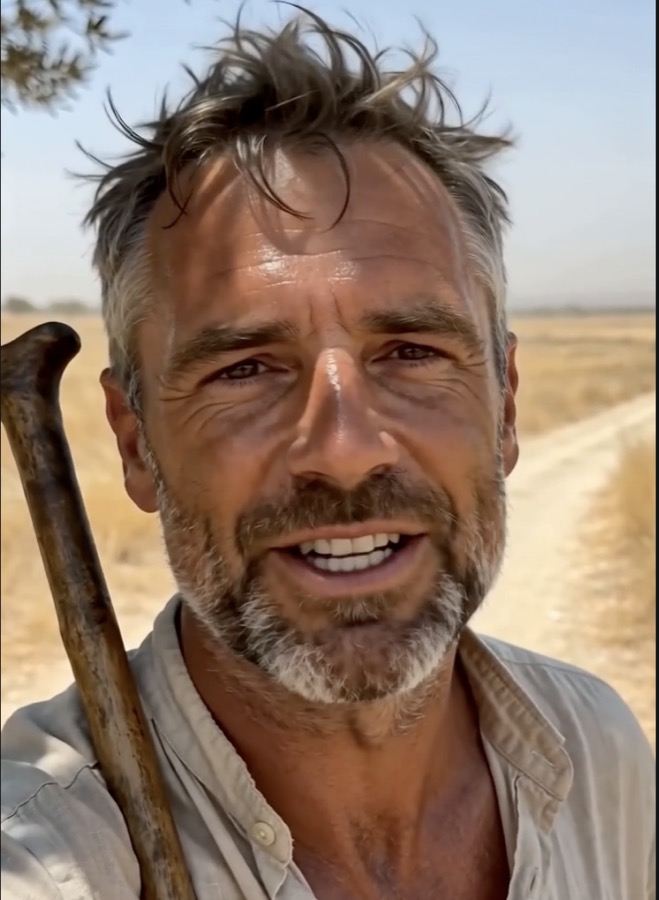
The voice was now right, but the approach had a cost. It locked every reel to the same starting frame and added two extra render steps, text to speech and then lip sync, plus the credits that go with them. It felt heavier and more rigid than the thing it was replacing.
What I settled on, and why
Stepping back, the original plain Seedance generation already solved the hard parts. The actor was consistent, the lip sync was native and free, and the visuals had variety. The only genuine problem was the accent, and the accent was never really a model limitation. It was a weak prompt.
So I deleted all of it. No cloning, no voice recast, no separate lip sync, no fixed start frame. The entire fix was rewording one constant to stop being polite about it.
- a light, easygoing Australian accent (soft and natural, not broad or exaggerated)
+ a clear, distinct, unmistakably Australian accent ...
+ a relaxed, friendly Australian man from rural Australia, definitely NOT American
That one change fixed it. The native Seedance voice now reads as Australian, and everything else stays as simple as it was.
The reasons it won:
- One generation, no extra steps or credits.
- Native lip sync, so the mouth always matches.
- No fixed start frame, so the daily visuals keep their variety.
- The accent is solved with words, which is the cheapest fix there is.
Lessons I am taking with me
- Try the simplest lever before the complicated one. The fancy pipeline existed only to fix a problem that a better sentence solved for free.
- When a generation ignores an instruction, it is often because the instruction is too polite. A
light, easygoing Australian accentgot ignored.unmistakably Australian, definitely NOT Americandid not. - Isolate the variable. Rendering the cloned voice straight to speech, with no video, is what finally told me the recast step was the problem and the clone was fine.
- Engine choice is a real knob. The same cloned voice was Irish on one engine and Australian on another.
- Pacing is a word budget against a time budget. Give the script more seconds before you start cutting lines.
- Mind the gaps in the tooling. A missing REST API for the new models is the reason this runs interactively today, so the flow is built to slot into automation without a rewrite later.
See it in the wild
The pilgrim you just read about goes out every single day. If you want to meet him properly, the daily weather reel and the rest of the guide live at mycaminoguide.com, and the reels land on Instagram at @mycaminoguide.
Give it a follow if you are planning your own Camino, or if you just enjoy watching a tired, happy pilgrim talk about the weather in a thoroughly Australian accent. Buen Camino.
Subscribe
New posts on AI, developer relations, photography, and the odd long walk, straight to your inbox. No spam.